

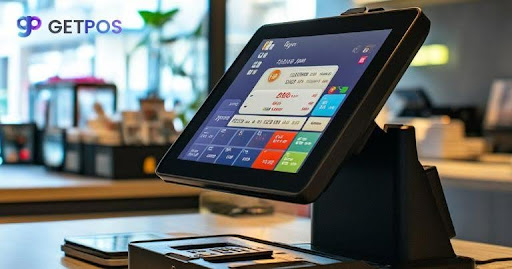
No matter the type, scale, and nature of business, it can greatly benefit from upselling to their customers. Usually, this process is manual, or to an extent slightly digital, but this needs to change and upgrade. Most businesses leave upselling to their cashiers. Cashiers or manual process of upsell can be challenging, which can mean lost revenue every single day for your business. The better way is to let your POS software handle it automatically. Modern POS systems can suggest extra items, apply bundle discounts, and remind customers to repurchase without any staff effort. In this blog post, we will cover five specific ways your POS software can increase every transaction automatically.
Why Automatic Upselling Works Better Than Staff Upselling
Manual upselling for your store, as the name suggests, can be more prone to human error or neglect as there can be challenges during the process for every customer.
What happens with staff upselling
Your cashiers have good days and bad days. On a busy day, they forget to upsell. On a slow day, they might feel pushy and stay quiet. Some staff are naturally good at it. Others are not. That means your revenue depends on who is standing at the register that day. That is not a reliable system.
What changes with automatic upselling
A POS system does not get tired or shy. It runs the same way every single time. When a customer checks out, the POS software shows the offer automatically. No one has to remember. No one has to speak.
Why customers prefer it
Here is something you should know. Many customers find spoken upselling annoying. But a suggestion on a screen feels different. It is less pressure. They can click yes or no without an awkward conversation.
Having the data advantage
Your POS system software remembers every purchase. It knows what a customer bought last time. Staff cannot keep that in their heads for hundreds of customers, but the retail POS can. That is why automatic upselling gets better results.
This way, you set it up once, and the system can run continuously. There is no training required, no reminders, no lost chances. It is best to let your technology do the selling so your staff can focus on service.
The 5 Ways POS Software Increases Sales Automatically
Here are easy and efficient ways that using the right POS software can help you with upselling of your products.
1. Add-on suggestions at checkout
How it works: When a customer adds an item to their cart, your POS system is designed to show a small pop-up or a side panel that displays related products which naturally pair with what they are about to purchase.
Example: Let us say someone buys a phone from your store. Your retail POS will immediately suggest a screen protector or a charging cable, and the customer can add it to their bill with just one click before completing the payment.
Why it works: The customer is already in buying mode with their wallet out and their mind ready to make purchases, so a small add-on feels easy to accept without any second thought or hesitation. The one-click addition means no extra typing, no searching through aisles, and no waiting for a cashier to grab the item from a shelf.
This is best for: Retail stores selling accessories, batteries, chargers, cables, and cases where every main product has a clear and obvious companion item that customers genuinely need.
2. Bundle discounts triggered by cart value
How it works: Your POS system software continuously checks the customer’s cart total or the number of items they have selected, and if the cart qualifies for a bundle deal you created earlier, the system offers the discount automatically at the checkout screen.
Example: Imagine you set up a simple rule in your system that says buy any two shirts and get 10% off. When a customer picks two shirts and reaches the checkout, your POS software shows the discounted price on screen without requiring any coupon code or cashier assistance.
Why it works: Customers love seeing immediate savings appear on their screen because it feels like a reward for buying more from your store rather than splitting their purchase across multiple shops. They did not have to ask for the discount or remember any promotional code, and that surprise saving builds goodwill while encouraging them to add even more items to their cart.
This is best for: Apparel stores, footwear brands, cosmetics shops, and grocery stores where customers regularly buy multiple similar items in a single shopping trip.
3. Volume upsell based on quantity thresholds
How it works: Your POS system keeps track of how many units of a particular item the customer is buying, and when the quantity is low, the system proactively suggests buying more units at a discounted rate per item.
Example: A customer adds just 1 pack of coffee to their shopping cart. Your retail POS instantly shows a clear message on the screen that says “Buy 3 packs and save 15%,” giving the customer a reason to add two more packs before completing their purchase.
Why it works: Customers who like a product will eventually use more of it over time, so buying it now at a lower price per unit makes practical sense for them while helping you capture future sales today. Your customer saves money on products they will need anyway, and you increase your average transaction value. That is why everyone wins with this method.
This is best for: Consumable products like coffee, snacks, pet food, dietary supplements, and pantry items that people use regularly and finish within a predictable timeframe.
4. Replacement reminders using purchase history
How it works: Your POS software remembers exactly when a customer last bought a consumable item, and at future checkouts, the system checks how much time has passed before reminding the customer to buy a replacement if enough days or months have gone by.
Example: A customer buys printer ink from your store, and your POS system notes the purchase date in their profile. Three months later, that same customer comes in to buy something else, and at checkout, the screen shows a helpful reminder that says, “Your ink may be low. Add a cartridge to this purchase?”
Why it works: Most customers simply forget to repurchase items that run out slowly because life gets busy, and they do not track dates for things like ink cartridges or water filters. By reminding them at the exact moment they are already making a purchase, you solve a problem they did not even realize they had, and they appreciate the helpful action rather than feeling pressured.
This is best for: Printer supplies, water filters, razor blades, vitamins, and any product that has a clear and predictable replacement cycle based on normal usage patterns.
5. Allow to redeem the loyalty point prompts
How this works: Your POS system software can track every loyalty point your customers earn with their purchase, and when their points reach a certain amount that qualifies for a discount or a free item, the system automatically shows a prompt at the checkout screen.
Example: A customer has accumulated 500 loyalty points from their past purchases. Your retail POS displays a clear message that asks to redeem them for $5 off that purchase, allowing the customer to save money right away.
Why it works: Most customers forget they have loyalty points and never track their balance or their expiration dates. When your POS shows the redemption offer automatically, you remind them of value they already earned. Using points feels rewarding, and customers want to earn more again, which keeps them coming back.
This is best for: Any retail business with a loyalty program, regardless of what products you sell. If you give points to customers, you should absolutely use this feature.
How To Set These Up On Your Existing POS System
- First, check if your POS system already has upselling features built in. Most modern systems do.
- Look for settings named Upsell, Cross-sell, Promotions, or Automatic Discounts inside your POS software.
- You can start with just one method, test it for two weeks, and track your average order value.
- Once you see results from the first method, add a second method and repeat the process.
- It is best to train your staff only on how to answer customer questions about the offers, because your POS system software handles
Final Note
Understand that your POS systems already collect sales data and process payments every day. But the best POS systems do more than that. They help you sell more without pushing your staff to become salespeople. The five methods we covered are simple to set up and run automatically. You do not need extra staff or training, just turn on the features inside your POS system software and let it work. You can start with one method and then measure your results.
FAQs
1. Will automatic upselling annoy my customers?
No, because screen suggestions feel less pushy than spoken offers. Customers appreciate being shown relevant products and savings they would have missed otherwise.
2. Can my POS system suggest different items to different customers?
Yes, modern POS software uses purchase history to show relevant suggestions. A coffee drinker sees coffee offers, not soda offers.
3. How much can automatic upselling increase my sales?
Businesses typically see a 20 to 30 percent increase in average order value when upselling is set up correctly in their POS system.
You can also read: Page Speed Optimization Tips









Leave a Reply