

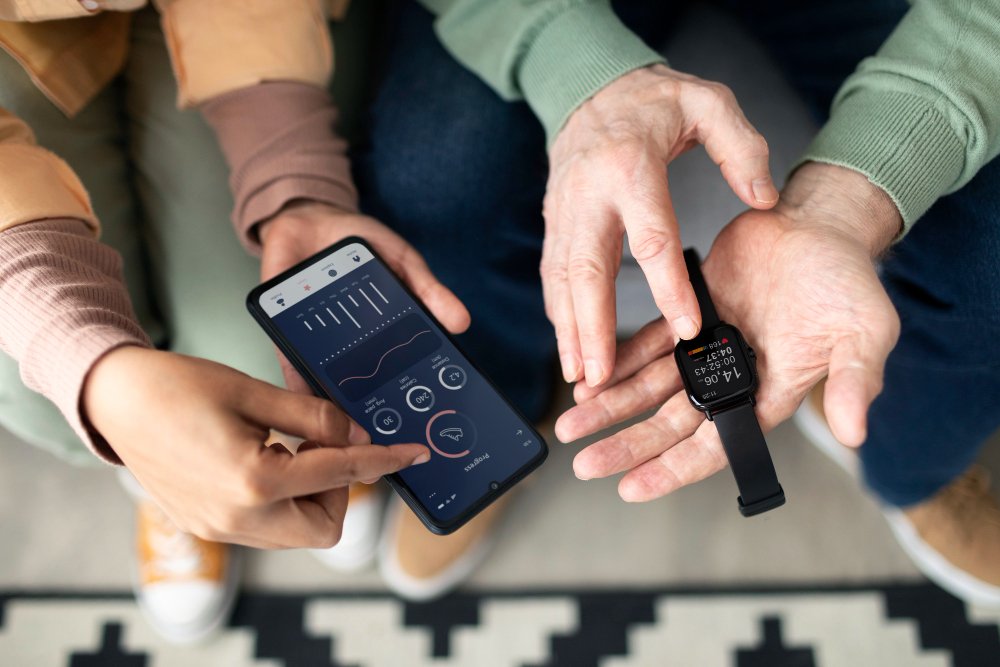
Wearable technology has quietly moved from novelty to necessity. Smartwatches track our heart rate. Fitness bands nudge us to move. Medical wearables monitor vital signs in real time. As a result, wearable tech apps now sit at the center of how users interact with these devices.
However, designing apps for wearables is not the same as designing for smartphones or tablets. Smaller screens, shorter interactions, and constant context changes demand a different mindset. Therefore, successful wearable apps feel effortless, timely, and deeply personal.
In this guide, we’ll explore how to design wearable tech apps that work across smartwatches, fitness bands, and emerging devices, while keeping users engaged and satisfied.
Explaining the Wearable Ecosystem
Before designing anything, it’s important to understand the wearable landscape. Wearables are not a single category. Instead, they include several device types with different capabilities.
Smartwatches, such as Apple Watch and Wear OS devices, offer touchscreens, apps, notifications, and voice input. Fitness bands, on the other hand, focus on tracking activity and health metrics with limited display space. Meanwhile, specialized wearables, like medical monitors or smart rings, often prioritize passive data collection over active interaction.
Because of this variety, designers must think beyond one device. A wearable app rarely stands alone. Instead, it usually works alongside a mobile app or cloud platform, sharing data and context seamlessly.
Why Wearable App Design Is Different
Wearable apps succeed when they respect users’ time and attention. Unlike smartphones, wearables are not meant for long sessions. People glance at them, interact briefly, and move on.
Therefore, wearable design emphasizes micro-interactions. Each tap, swipe, or notification must deliver value instantly. If users need to think too much, the app has already failed.
Additionally, wearables are always with the user. This creates opportunities, but also responsibilities. Apps must feel helpful, not intrusive. Smart timing, relevance, and restraint matter more than flashy features.
Designing for Small Screens and Quick Glances
Screen size is the most obvious challenge. Wearable displays are small, and some fitness bands barely show more than text and icons.
As a result, clarity becomes the top priority. Designers should strip interfaces down to essentials. Large fonts, simple icons, and high contrast improve readability at a glance.
Moreover, content hierarchy matters. The most important information should appear first, without scrolling. Secondary details can live deeper in the experience or on the companion mobile app.
Therefore, when in doubt, ask a simple question: Can a user understand this screen in three seconds or less? If not, it likely needs simplification.
Context-Aware and Purpose-Driven Experiences
Wearables shine when they understand context. Location, time, movement, and biometric data all provide signals about what the user needs in the moment.
For example, a fitness app might show workout controls during exercise but switch to recovery stats afterward. Similarly, a smartwatch notification should adapt based on whether the user is walking, driving, or resting.
Because of this, wearable apps should focus on specific use cases rather than broad functionality. Each interaction should serve a clear purpose. Overloading the app with features only creates friction.
Notifications: Useful, Not Noisy
Notifications are one of the most powerful and risky features of wearable apps. Done well, they feel like helpful nudges. Done poorly, they become constant interruptions.
Effective wearable notifications are timely, relevant, and actionable. They tell users what matters now and often allow quick responses, such as dismissing, snoozing, or confirming an action.
Equally important, users should always feel in control. Custom notification settings build trust and reduce fatigue. When users can fine-tune what they receive, they’re more likely to stay engaged long term.
Performance, Battery, and Reliability
No matter how elegant the design, performance issues will drive users away. Wearable devices have limited processing power and battery life. Therefore, apps must be lightweight and efficient.
Designers and developers should minimize background activity, reduce unnecessary animations, and optimize data syncing. Every design decision affects battery consumption.
Reliability also matters. Wearable apps often support health or safety use cases. If data is inaccurate or syncing fails, users quickly lose confidence. Clear feedback, such as sync indicators or error messages, helps manage expectations.
Accessibility and Inclusive Design
People of all ages and abilities use wearable tech. As a result, accessibility should be part of the design process from day one.
Simple language, readable text sizes, and strong contrast improve usability for everyone. Voice interactions and haptic feedback also make wearables more inclusive, especially for users with visual or motor challenges.
Additionally, designers should consider cultural and lifestyle differences. Fitness goals, health metrics, and usage patterns vary widely. Therefore, flexible settings allow users to personalize their experience without complexity.
The Role of Companion Apps
Most wearable apps rely on companion mobile apps for deeper interactions. While wearables handle quick actions, mobile apps manage setup, detailed analytics, and customization.
Therefore, consistency across platforms is critical. Visual language, terminology, and data presentation should feel unified. Moreover, users should never feel like they are switching between disconnected products.
This is where cross-platform mobile solutions become especially valuable. They allow teams to maintain consistency, reduce development overhead, and ensure smoother data flow between wearables, smartphones, and cloud systems.
Testing in Real-World Scenarios
Designing for wearables requires real-world testing. Desk-based testing only goes so far. Wearables behave differently when users are moving, sweating, or distracted.
Field testing reveals insights that prototypes cannot. For example, a button that seems large enough indoors may be hard to tap while running. A notification that feels helpful in theory may become annoying during daily routines.
By observing real usage, designers can refine interactions, reduce friction, and deliver more natural experiences.
Security and Data Privacy by Design
Wearable apps often handle sensitive personal data, especially health and location information. As regulations tighten and users become more privacy-conscious, trust is non-negotiable.
Designers should work closely with product and engineering teams to ensure transparent data practices. Clear consent flows, understandable privacy settings, and visible security cues build confidence.
Importantly, privacy should not feel like an afterthought. When handled well, it becomes part of the user experience rather than a legal checkbox.
Emerging Trends in Wearable Tech Design
Wearable technology continues to evolve. Smart rings, AR glasses, and medical-grade wearables are expanding what’s possible.
AI-driven insights are also becoming more common. Instead of raw data, users increasingly expect meaningful recommendations. However, these insights must remain explainable and respectful of user autonomy.
At the same time, voice and gesture-based interactions are gaining traction. As screens become smaller or disappear entirely, designers will need to rethink traditional UI patterns altogether.
Final Thoughts: Designing for the Human, Not the Device
At its core, wearable tech app design is about empathy. The best apps fade into the background, supporting users without demanding attention.
By focusing on clarity, context, performance, and trust, designers can create experiences that feel genuinely helpful. While devices and platforms will continue to change, the goal remains the same: make technology work naturally within people’s lives.
When wearable apps respect users’ time, needs, and privacy, they don’t just succeed; they become indispensable.

















Leave a Reply