

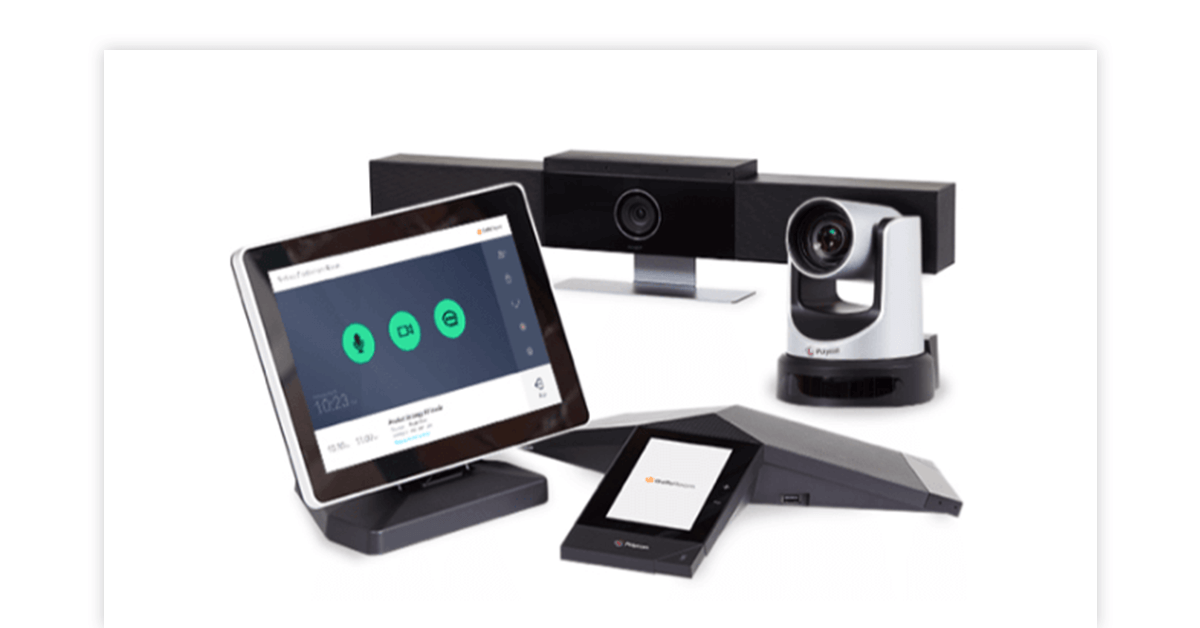
In the modern corporate landscape, the traditional office paradigm has completely shifted. Hybrid work models are no longer a temporary arrangement; they are a permanent structural shift. As remote teams, global clients, and distributed branch offices collaborate daily, high-quality communication infrastructure has transitioned from a boardroom luxury to an operational necessity.
At the heart of this collaborative shift is video & web conference equipment. While early remote setups relied on laptop webcams and fuzzy built-in microphones, today’s enterprise environments demand broadcast-quality clarity, intuitive user interfaces, and flawless execution. A lagging video feed, dropped audio, or clunky room pairing process doesn’t just cause a minor delay—it actively damages professional credibility and disrupts business momentum.
Whether you are looking to outfitting a cozy huddle room, setting up an executive boardroom, or standardizing hardware across a multinational enterprise, this comprehensive guide covers the essential components, setup categories, and key considerations for modern web conferencing hardware.
The Essential Components of an Enterprise Conference Setup
A reliable web conferencing system is an ecosystem of interconnected devices. To achieve clear audio and crisp video, several foundational hardware layers must work together seamlessly:
1. High-Definition Conference Cameras
The camera sets the entire tone for your virtual interactions. Legacy webcams often struggle with lighting imbalances and wide-angle distortions. Modern solutions feature:
- 4K Ultra-HD Resolution: Ensures sharp, lifelike detail, which is particularly vital for displaying physical assets, blueprints, or whiteboards.
- PTZ (Pan-Tilt-Zoom) Functionality: Allows remote users or local participants to adjust the camera angle and zoom in on specific speakers or presentation materials without degrading image quality.
- AI Auto-Framing & Speaker Tracking: Intelligent cameras use facial recognition and voice localization to automatically adjust the frame, centering on whoever is actively speaking while eliminating dead space in the room.
2. Studio-Grade Audio: Microphones & Speakers
In video conferencing, poor audio quality is far more disruptive than low video resolution. If a display freezes for a second, a meeting can usually proceed; if the microphone cuts out, the meeting halts entirely.
- Beamforming Microphone Arrays: These advanced microphones dynamically map the room, focusing on human voices while filtering out background ambient noise like HVAC systems or keyboard typing.
- Expansion Mics & Table Pods: Vital for larger boardroom tables, ensuring that participants seated at the far end of the room are heard just as clearly as those sitting near the main display.
- Full-Duplex Audio Systems: Enable natural, simultaneous two-way conversations without the awkward audio clipping or muting that plague cheaper, half-duplex speakerphones.
3. Dedicated Conference Room Consoles (MTR and Zoom Rooms)
Relying on a single employee to bring their laptop, plug in four different cables, and host the meeting creates an immediate technical bottleneck. Modern configurations deploy standalone room compute modules:
- Touch Control Panels: Sleek, tabletop touchscreens that let users join scheduled meetings with a single tap, adjust the volume, share content, and manage participants instantly.
- Platform Native Systems: Pre-configured hardware dedicated specifically to software ecosystems like Microsoft Teams Rooms (MTR), Zoom Rooms, or Google Meet, minimizing cross-platform handshake bugs.
Right-Sizing Your Hardware: Huddle Rooms to Boardrooms
There is no one-size-fits-all solution for video & web conference equipment. Deploying a massive, multi-mic boardroom system into a small breakout room is a waste of budget, while placing a small standalone webcam in an executive conference hall guarantees a poor user experience.
[Diagram depicting hardware scaling: All-in-One Video Bars for Huddle Rooms, Modular Systems for Medium Rooms, and Multi-Camera/Mic Arrays for Executive Boardrooms]
The Huddle Room & Small Meeting Space (2–5 Participants)
Huddle rooms require quick setup and minimal clutter.
- The Best Hardware Approach: Integrated All-in-One Video Bars. These sleek units combine the camera, microphone array, and speakers into a single chassis that sits neatly above or below a display. They drastically reduce cabling and are incredibly easy for non-technical staff to operate via plug-and-play USB interfaces.
The Medium Conference Room (6–12 Participants)
Medium spaces require a wider field of view and extended audio pickup ranges to account for longer meeting tables.
- The Best Hardware Approach: Dedicated, modular room systems. A separate high-definition PTZ camera paired with central tabletop smart-speakers and an intuitive touch controller ensures every participant is properly framed and heard without crowding around a single device.
The Large Boardroom & Training Hall (12+ Participants)
Large-scale rooms require complex AV engineering to capture massive physical spaces uniformly.
- The Best Hardware Approach: Multi-microphone setups embedded directly into the ceiling or long tables, paired with dual displays (one for shared content, one for remote participants). Incorporating advanced DSPs (Digital Signal Processors) is critical here to handle complex echo cancellation and ensure audio synchronization across vast spaces.
Key Technical Factors to Evaluate Before Purchasing
Before investing in new web conferencing assets, IT decision-makers should carefully evaluate several critical operational factors:
- Software Interoperability: Ensure the hardware features certified compatibility with your preferred communication platforms. Look for equipment with official certifications for Zoom, Microsoft Teams, Cisco Webex, or Google Meet to ensure seamless firmware updates and remote management.
- Wired vs. Wireless Content Sharing: Look for systems that offer flexible content-sharing options. While direct HDMI connections are ultra-reliable, supporting wireless casting protocols (like Miracast, AirPlay, or proprietary software casting) makes impromptu presentations effortless for external guests.
- Power over Ethernet (PoE) Support: Choosing hardware that supports PoE simplifies cable routing immensely by delivering both high-speed network connectivity and device power through a single Cat6 Ethernet cable, eliminating the need for bulky external power bricks behind displays.
Sourcing Enterprise-Grade Collaboration Hardware
Upgrading your company’s communication infrastructure requires reliable components built for continuous enterprise use. Cutting corners on subpar consumer-grade peripherals frequently results in connection dropped calls, fragile ports, and ongoing IT support headaches.
For organizations looking to deploy or upgrade their communication spaces, sourcing high-performance IT assets from an established vendor is crucial. Tecisoft offers an expansive procurement catalog tailored for modern enterprise needs. From robust AV peripherals and specialized networking components to high-speed interconnect cables that bind complex hardware configurations together, they provide the underlying infrastructure required to build seamless, dependable, and crystal-clear business communication environments.
Conclusion: Investing in the Future of Connected Work
High-quality video & web conference equipment is no longer an afterthought—it is the digital front door to your business. When remote employees, partners, and prospective clients look at your team through a clear, high-definition camera feed and hear crisp, uncompromised audio, it reflects an organization that prioritizes professionalism, precision, and smooth execution.
By choosing the right hardware scale for your rooms, focusing on pristine audio, and selecting versatile enterprise components, you remove the friction from daily collaboration. This investment ultimately transforms everyday virtual meetings from a disjointed chore into a powerful engine for organic business growth.

















Leave a Reply